

Stijn and Bram take a deep dive into 3D visualisation using ARKit and the Apple Vision Pro.
XR
July 3, 2026
—
12 min
READ
Building a Gaussian splat pipeline for wound care
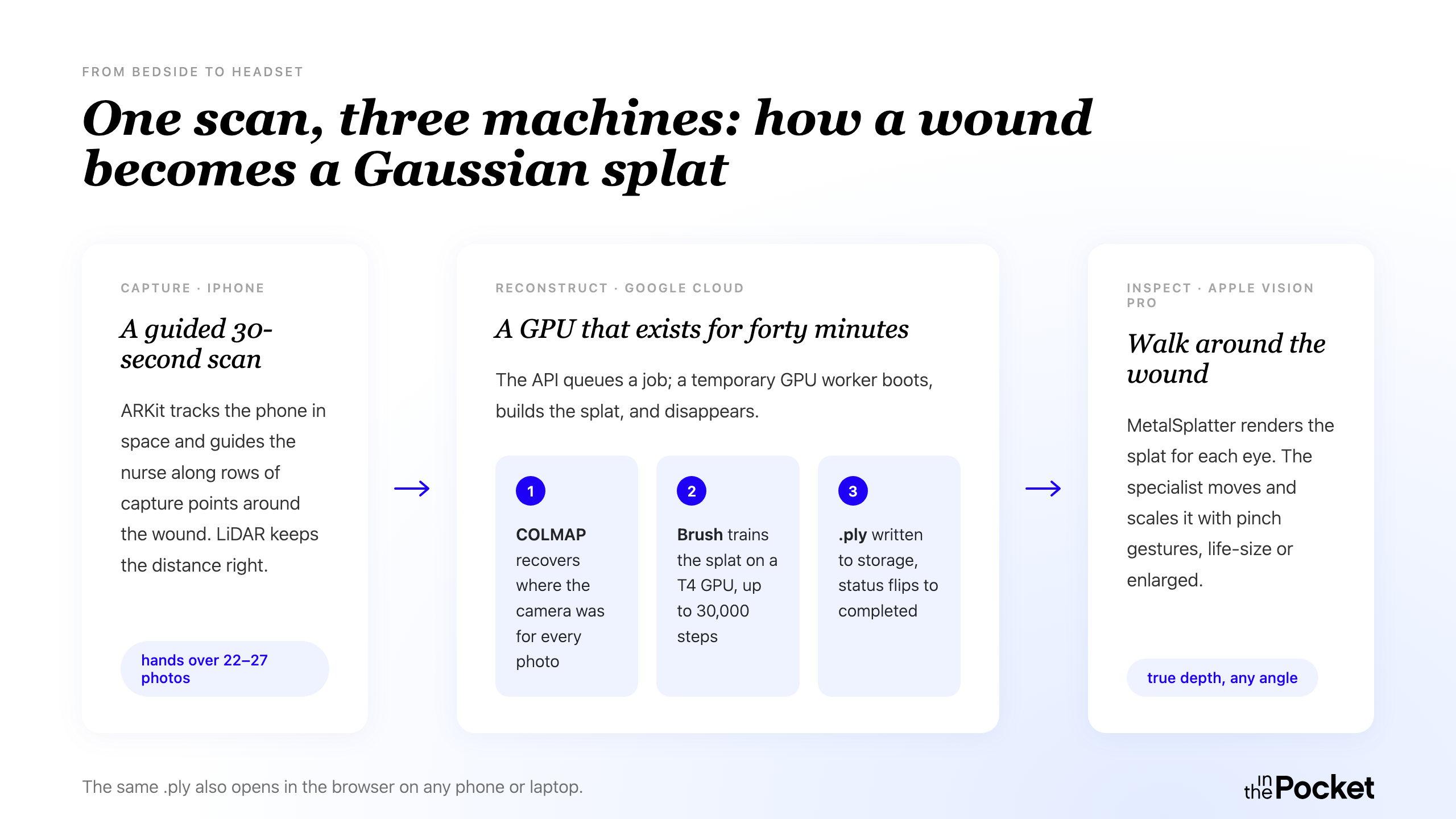
Scan a wound for thirty seconds with an iPhone, and a specialist on the other side of the country can walk around that wound in 3D, as if they were standing at the bedside.
That was the goal: getting a specialist's eye on a complex wound without the specialist having to be there. A general practitioner (GP) or nurse captures the wound with a phone; an expert inspects a 3D reconstruction of it on an Apple Vision Pro, from wherever they are.
We covered the why in the case we published: complex wounds heal slowly and need a specialist's follow-up, but the primary care providers treating them rarely have one on hand. This post is the technical half of that story: what we built, what we tried, and what we threw away along the way. And how we built the whole pipeline in two months.
Let's dive in deep
1### In Deep is a blog series where we take the plunge and pull you deep into the details.
2
3This blogpost is ideal for:
4- XR developers, 3D artists, ARKit and Apple Vision Pro enthusiasts;
5- people interested in HealthTech and innovation in healthcare;
6- and anyone who just loves a good gaussian splat.
The iOS app
The iOS app does one thing: a nurse or GP points an iPhone at a wound, takes a series of photos from different angles, and ends up with everything the pipeline needs to rebuild that wound in 3D for a specialist to inspect later.
Why ARKit
We needed more than pretty pictures. To guide someone through a scan and to know when the scan is complete, the app has to understand where the phone is in physical space. Apple's ARKit gives us that for free: as you move, it continuously tracks the phone's position and orientation in the room. That's what lets us place capture targets around the wound, check whether you're at the right distance, and detect the exact moment the phone reaches the next angle. So instead of just opening the camera, we built the capture flow on ARKit's world tracking.
Why photos, not video
The obvious instinct on a phone is to record a video. But a video locks the viewpoint: the specialist only ever sees the wound from the angles the nurse filmed. We wanted the opposite. The specialist on the Vision Pro picks the angle, not whoever happened to hold the phone.
So we are not capturing footage for someone to watch. We are capturing input for a reconstruction. And for that, individual photos beat video frames. Video frames are compressed, often motion-blurred, and exposure drifts as the camera moves. For a pipeline that depends on sharp, well-exposed frames from known angles, that is a lot of noise to fight. We grab them from the AR session instead, each one tagged with the exact position it was taken from. Cleaner inputs, and a one-to-one mapping between an image and a viewpoint.
Getting the capture distance right
The pipeline is picky about capture distance. Too far away and the wound is just a detail in a wider scene. Too close and you can't move around it without losing tracking. iPhone Pro devices have LiDAR, a sensor that measures distance, and we use it to read the depth at the centre of the frame. We check that at the start of a scan to confirm the user is in the right range, and tell them to step back or move closer if not. Once they're in the right spot, they set the wound as the target and the app takes it from there.
If the device doesn't have LiDAR, the app falls back to a sensible default distance and trusts the user to hold roughly the right range. Less precise, but enough to get a usable scan.
Getting to 22–27 photos in under thirty seconds
This is the part of the app we iterated on most.
Our first version was the naive one: the user moved the phone around the wound freely and the app captured a photo several times a second. It worked, in a sense. The backend got enough images. But it took a long time, and most of the frames were near-duplicates that added barely any new information. We were handing the backend hundreds of photos where a couple of dozen good ones would do.
The next idea was AR orbs. We placed floating spheres around the wound in 3D space, distributed across the angles we needed. The user moved the phone towards each orb while keeping the wound in frame, and the app auto-captured a photo the moment the phone reached it. No tapping, no manual trigger. It was a step up. But the orbs were scattered across a hemisphere, and it wasn't always obvious which one to go to next. Users would often have to step back to get their bearings, which added time and broke the flow.
We restructured this into rows. Instead of a scattered cloud, the orbs are arranged in horizontal sweeps at different elevations around the wound. Each row starts where the previous one ended, and a guiding arrow on screen always points you towards the next orb in the sequence. Once you find the first one in a row, you don't need to look for the next: you just keep moving in the same direction and the orbs come to you. If an orb drifts off the edge of your screen, an arrow pins to the edge and points you back towards it.
The result is a scan of 22 to 27 photos, done in well under thirty seconds. The photos cover the wound from above, at an angle, and from closer to ground level: the minimum set the reconstruction needs to build a clean splat.
The 3D reconstruction
A picture is worth a thousand words. A Gaussian splat is worth a thousand pictures.
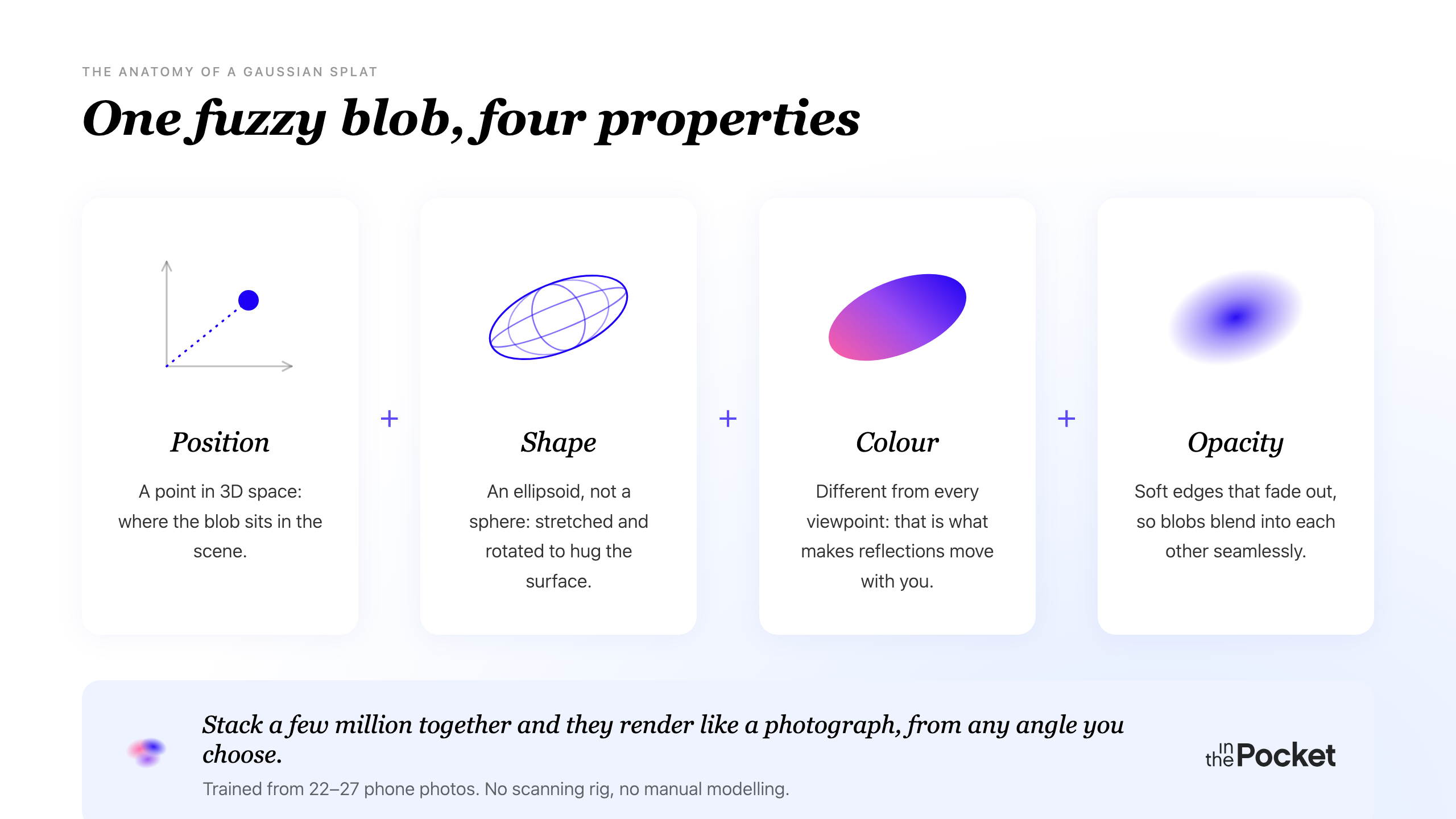
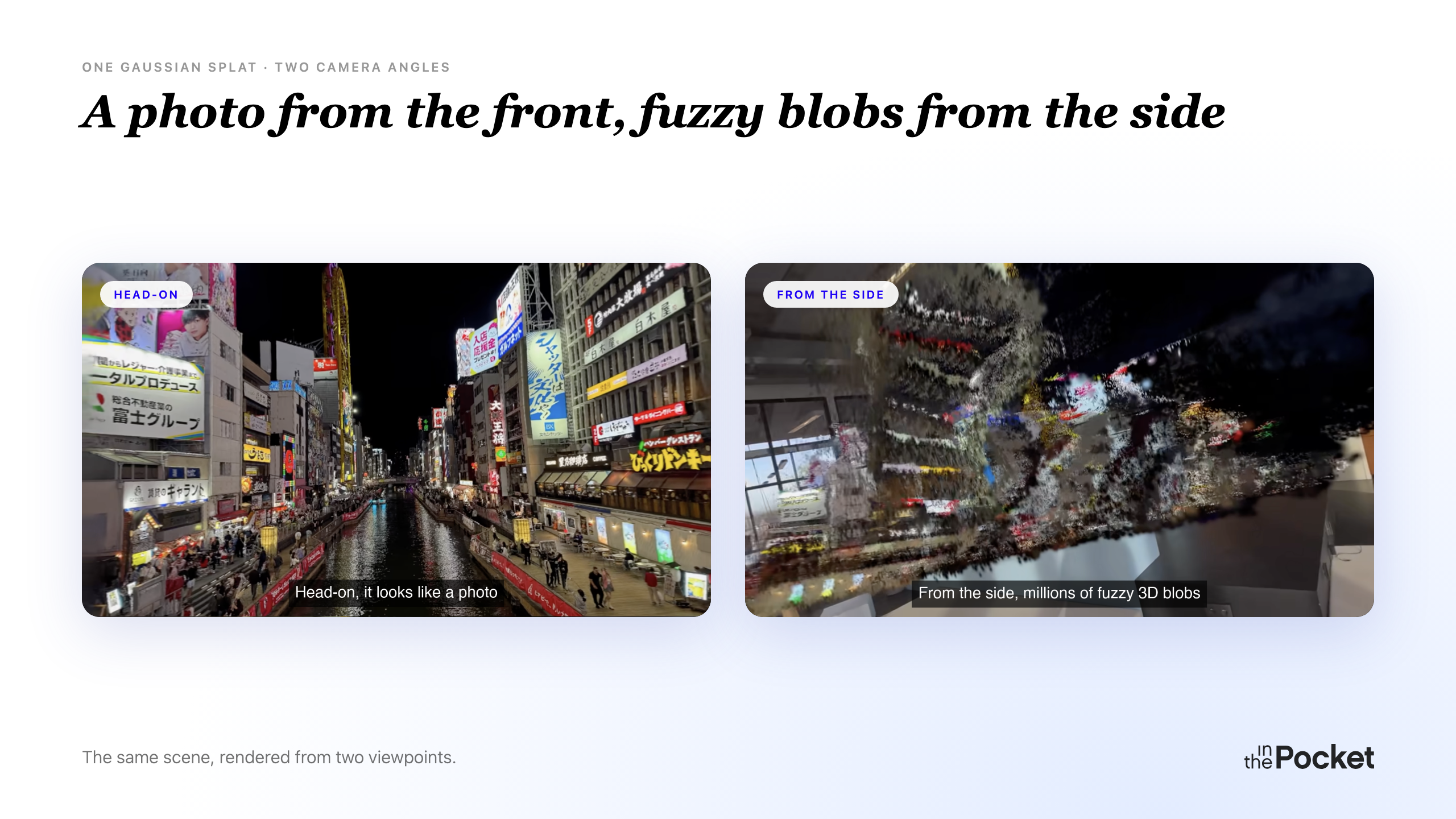
Less poetically: a splat is a scene represented as a big cloud of fuzzy coloured blobs. Each blob (a "Gaussian") has a position in 3D space, a shape (it is an ellipsoid, not a sphere), a colour, and an opacity. Stack a few million of these together and you get something that, when rendered, looks remarkably like a photograph of the real scene, from any angle you choose.
Three things make it interesting compared to older approaches like meshes or NeRFs:
- The reflections move with you. A regular 3D model bakes the surface in, so a highlight sits in the same place wherever you stand. A splat stores appearance per viewpoint instead: move around it and the reflections shift, like the sun sliding across a lake as you walk past. On a wound, that is the light catching a moist surface differently from every angle.
- It is fast to display. Splats are drawn with the same GPU techniques games use, rather than the heavy per-pixel ray calculations a NeRF needs. That is why a splat runs in real time on a Vision Pro instead of on a render farm.
- It is trained from photos. No expensive scanning rig, no manual modelling. Show it enough pictures from enough angles and it figures the scene out.
For a wound, this combination is what you want. A lot of the clinical signal lives in detail a flat photo loses: the colour of granulation tissue as it heals, the moisture, the depth of the wound bed. The specialist needs to read all of it from any angle, without artefacts getting in the way.
The backend
Now to actually build one. The phone hands off its 22 to 27 photos; everything else happens in the cloud. Fair warning: this is the most technical section of the post. If cloud infrastructure isn't your thing, skip ahead to The Vision Pro app. You won't lose the plot.
A boring CRUD API, on purpose
FastAPI on Cloud Run, Postgres on Cloud SQL, JPEGs on Cloud Storage. "Boring" is a compliment here: all the novelty in this project lives in the capture and the reconstruction. The plumbing in between should do nothing clever, and therefore nothing surprising. The lifecycle is exactly what you'd expect.
POST   /splats                  # create + upload images
POST   /splats/{id}/process     # kick off training
GET    /splats/{id}             # poll status
GET    /splats/{id}/download    # download the .ply
DELETE /splats/{id}
Each splat is a row in the database, walking through pending, processing, completed, or failed. The iOS and visionOS apps share the same contract.
The pipeline
The API doesn't train anything itself. Cloud Run has no GPU, and a 30-minute request is not a request, it's a hostage situation.
Instead, POST /splats/{id}/process drops a message on a queue (Pub/Sub). A small cloud function picks it up and spins up a training job on a machine with a GPU (a Vertex AI custom job on an NVIDIA T4).
That training job, the "worker", is a temporary machine that exists only for this one splat: it boots, pulls the photos from storage, reconstructs the camera positions, trains the splat, writes the resulting .ply file back, updates the database row, and disappears. The apps poll until the status flips to completed.
Decoupled by design. The API is cheap and always-on. The GPU only exists for the ten to forty minutes a job takes. One failed job doesn't take anything else down.
From photos to splat
Training needs to know where the camera was for every photo. The phone already knows this: ARKit tracks it throughout the scan. But our production pipeline recomputes the poses in the cloud with COLMAP, a structure-from-motion tool that derives camera positions purely from the overlap between photos. Recomputing sounds wasteful, but it is robust: the reconstruction no longer depends on how well ARKit's tracking held up ten centimetres from a wound. (We did build an upload path that ships the ARKit poses and skips COLMAP entirely, a speed-up we haven't switched on yet.)
With poses recovered, the worker hands everything to the trainer, which produces the .ply.
Brush
The first prototype trained with Nerfstudio's splatfacto. It works, but you inherit CUDA, PyTorch, Nerfstudio and a long tail of Python dependencies. Container builds were slow, and cold starts on the GPU machines were worse.
So we switched to Brush, an open-source splat trainer written in Rust. It compiles to a single small binary, and it runs on Vulkan, a graphics API that works across GPU vendors, rather than being tied to NVIDIA's CUDA. The runtime image dropped from multiple gigabytes to something lean, and the cold starts followed.
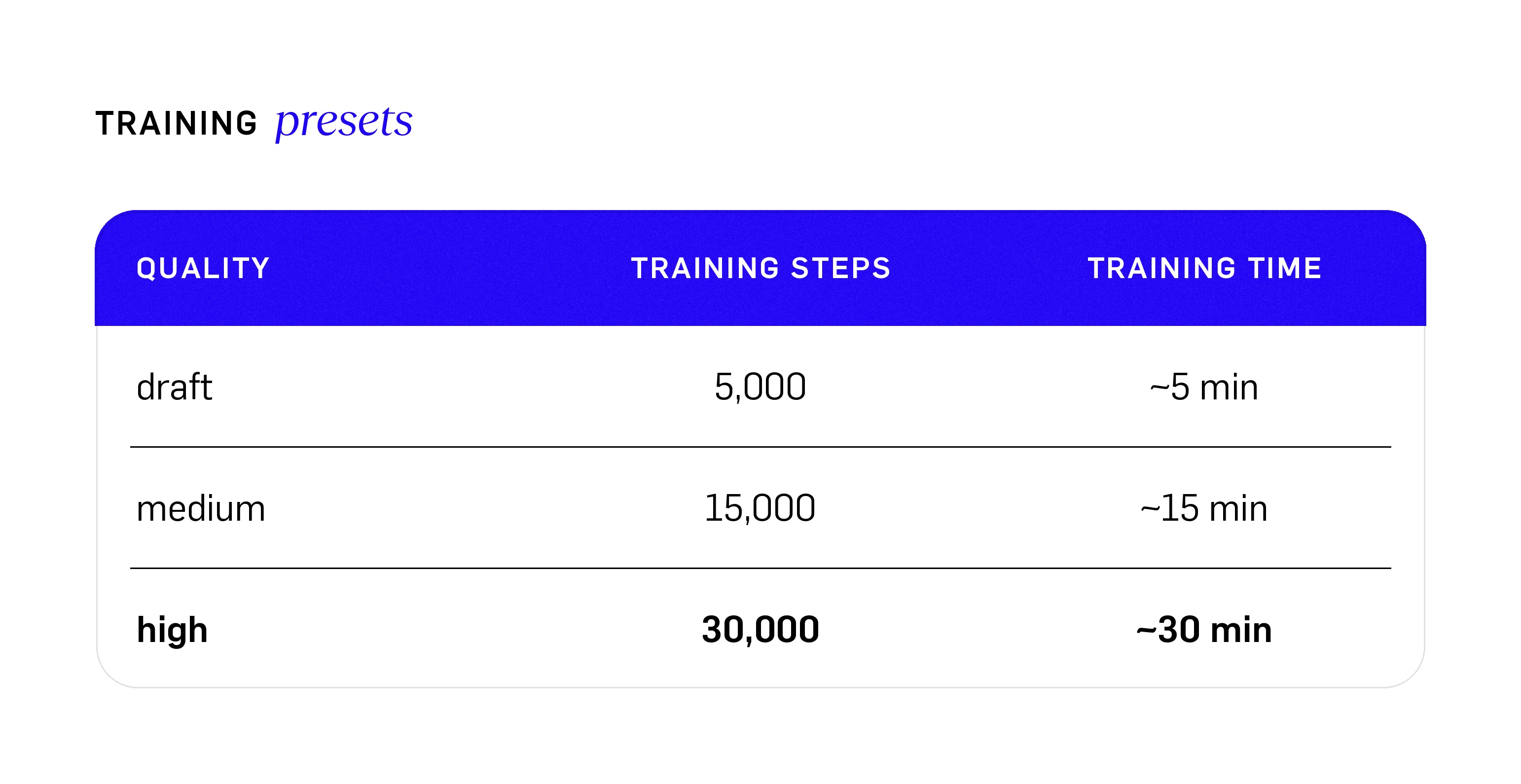
Those are training times only. COLMAP runs first and adds a few minutes on top of the training itself, which is where the ten-to-forty-minute job range comes from.
The Vision Pro app
Why a Vision Pro
A wound is 3D. A photo flattens it, and so does a 3D viewer on a laptop screen. On the Vision Pro you actually walk around it. That's the whole reason this case ends in a headset rather than a tablet.
True 3D
A quick refresher: a splat is millions of fuzzy blobs whose colour shifts depending on where you look from. That's what keeps it from looking plasticky. On the Vision Pro, each of your eyes gets its own, slightly different render, exactly like looking at a real object. Stereoscopic depth stacks on top of the view-dependent shading. Walking around the splat feels like walking around the thing itself.
The renderer is MetalSplatter, an open-source engine that draws Gaussian splats using Metal, Apple's graphics framework. That makes it a natural fit for getting real-time performance out of the Vision Pro. Each frame, ARKit tells us where the headset is, we apply the user's hand-driven position, rotation and scale, and MetalSplatter draws the splat for both eyes.
High quality, where it matters
Every splat that reaches the Vision Pro was trained at the highest quality preset: 30,000 training steps, against the 5,000 a draft gets. At the Vision Pro's resolution, that difference is impossible to miss. A draft splat looks fine on a phone screen, but lean in close in the headset and the fuzz shows: you start seeing the individual blobs. A high-quality splat holds up. It reads as a surface, as skin, not as a cloud of dots.
Hands-only
A clinician rarely has a free hand: gloves, dressings, a tablet to carry. So the interaction is hands-only and minimal:
- Pinch with both hands to move and scale the splat.
- Look at the controls panel and pinch to rotate or reset.
No controllers, no stylus. The wound floats in the room at whatever size is useful: life-size for context, enlarged for detail.
The one we didn't crack: AI wound analysis
The hospital asked for one more thing: could AI analyse the scan and give the specialist a second opinion, right there in the headset? A fair question: judging tissue types is exactly the kind of visual task you'd hope today's vision models could help with. So we tried it.
The short answer: not yet. Not with a general-purpose model, anyway.
Here's what we built: in the headset, the app sends a photo from the scan to a general-purpose vision model (we used Gemini 3 Pro) with a structured prompt asking for exactly what a wound nurse scores — the share of granulation tissue, slough, necrosis and new epithelium, plus the moisture level. The model looks at a flat photo, not the splat itself.
It gets some things right. But within a handful of tests it was clear that a clinician's eye is far, far better than anything you get from a model out of the box. Which isn't surprising. Wound assessment is years of specialist experience. A general-purpose model has read about wounds; it hasn't treated any.
So we drew our conclusion and parked it, deliberately: for a problem like this, a general model is the wrong tool today. A model trained on real wound data is the more promising path, and that's a project of its own.
One test did make us laugh. We didn't exactly have a supply of real wounds to scan, so most of our testing happened on whatever was sitting on the desk. For a slightly more realistic test, we smeared ketchup on an arm and scanned that to fake blood. The model wasn't fooled: it correctly pointed out that this probably wasn't blood — it looked more like ketchup. Good enough to catch us cheating, not good enough to read a wound. That gap is the whole story.
Closing
A picture is worth a thousand words. A Gaussian splat is worth a thousand pictures.
The Vision Pro is the best way to view one: nothing else gives you true depth at true scale. But it isn't the only way, and that's a feature, not a contradiction: the same .ply file runs smoothly in the browser on a phone or laptop. A clinician on a ward round or a colleague at their desk can pull up the same capture for a quick look, and reach for the headset when the inspection really matters.
We built this for wound care at AZ Maria Middelares because that's where the need was sharpest: patients who need a specialist's eye, and specialists who can't be everywhere at once. But the pipeline we ended up with (phone, cloud, splat, headset) isn't tied to wounds at all. Dentistry, surgical prep, accident reconstruction, museum archiving, manufacturing inspections, insurance claims: anywhere someone needs to inspect a real object without being in the room. The case is about wound care. The result is a way to teleport into a room.
Stay ahead
of the game.
Sign up for our monthly newsletter and stay updated on trends, events and inspiring cases.
Thank you! Your submission has been received!
Oops! Something went wrong while submitting the form.